Introduction to bank feeds
Summary
Description
You can connect Sage Accounting Start to your online bank with a secure bank feed. We’ll automatically check for new transactions each day and download them as soon as possible.
Transactions usually show in Accounting the day after they show in your bank account.
Once transactions are uploaded, you can easily create and apply bank rules and bulk delete any duplicate transactions before they are imported into Accounting.
Resolution
What are bank feeds
A bank feed is a secure connection between your bank account and Sage Accounting.
Once connected, transactions are imported from your bank account into Accounting. Once imported you simply choose whether to create a new payment or receipt, match to a payment or receipt you've already entered, or choose the invoice that's being paid.
To save you even more time, you can set up rules for common transactions such as your direct debits.
Connect to your bank
You can either connect directly to your bank, or via Plaid, our third party provider.
For some banks, we only have one type of connection, and for others you can choose. For all connections you have to confirm that you authorise Sage to connect your bank account.
See a list of banks that support bank feeds.
Direct bank feed
For direct bank feeds you will see Connection powered by Sage next to the Bank name. This means that Sage directly links to your Bank without needing to connect through a third party provider.
See how to connect a bank feed.
Bank feeds via Plaid
To securely import your bank transactions, we’ve partnered with Plaid, an FCA authorised service to form a direct connection with your bank.
When connecting via Plaid, you sign into your online bank account to authorise the connection. This connection can be active straight away or in a few hours.
See how to connect a bank feed.
Banks without bank feeds
If a bank feed is not available for your bank, you can tell us about it and we can work on trying to add it.
To do this, click on Tell us about it from the search results.

As an alternative, you can import your bank statement into Sage Accounting.
See how to import your bank statement here.
Review bank transactions
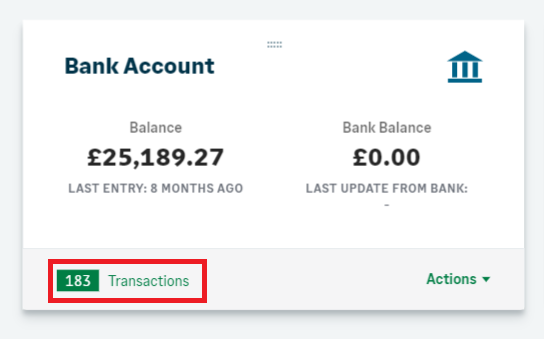
Once your bank feed is connected, you'll see the number of imported transactions on the Banking page. Select the number to view all the transactions on the Incoming Bank Transactions page.
For each transaction you need to choose whether to:
- Match transactions to outstanding invoices, credit notes or receipts
- Create a new transaction
- Transfer from or to a different account
- Delete transactions you don’t want to import
- Or you can create bank rules for regular transactions
Help with bank feeds
Solution Properties
- Solution ID
- 222001000100049
- Last Modified Date
- Mon Nov 17 15:02:34 UTC 2025
- Views
- 0