How to use the Write-off, Refunds and Returns wizard
Summary
Description
You can use the Write Off, Refunds and Returns wizard to process write-off and refund procedures for easily customers and suppliers.
 TIP: Only one user at a time can access the wizard. Log other users out while you're using it.
Resolution
 NOTE: Follow our alternative article to process foreign transaction write-offs.
Using the wizard
- Go to Customers or Suppliers then select Write offs.
- Click the relevant Area to action and complete the dropdown field with the Account or value.
- Click Next.
NOTE: Select the Area below in the Options in the wizard section, for more information. - Follow the on-screen prompts using the buttons to navigate.
After entering the information on each window, the Post Data summary window appears. - Ensure the information is correct then to most the information, click Post.
To modify any previous information, click Back, or to cancel the wizard, click Cancel.
Options in the wizard
Use this option to create a credit and refund the value of a paid invoice. For example, if you return goods and receive a full refund.
Customers
This posts a sales credit to reverse the effects of the original invoice and a sales payment to correct the balance on your bank. The sales payment allocates automatically to the sales credit.
This example is for a sales invoice for £/€60.00 including VAT.
Original transactions
| Type | N/C | Details | Date | Ref | Net | Tax | T/C |
|---|---|---|---|---|---|---|---|
| SI | 4000 | Original Invoice | 01/02/2024 | 50.00 | 10.00 | T1 | |
| SR | 1200 | Customer Receipt | 01/02/2024 | 60.00 | 0.00 | T9 |
Transaction posted by the wizard
| Type | N/C | Details | Date | Ref | Net | Tax | T/C |
|---|---|---|---|---|---|---|---|
| SC | 4000 | Refund | Date | REFUND | 50.00 | 10.00 | T1 |
| SP | 1200 | Sales Payment | Date | REFUND | 60.00 | 0.00 | T9 |
Suppliers
This posts a purchase credit to reverse the effects of the original invoice and a purchase receipt to correct the balance on your bank. The purchase receipt allocates automatically to the purchase credit.
This example is for a purchase invoice for £/€60.00 including VAT.
Original transactions
| Type | N/C | Details | Date | Ref | Net | Tax | T/C |
|---|---|---|---|---|---|---|---|
| PI | 4000 | Original Invoice | 01/02/2024 | 50.00 | 10.00 | T1 | |
| PP | 1200 | Supplier Payment | 01/02/2024 | 60.00 | 0.00 | T9 |
Transaction posted by the wizard
| Type | N/C | Details | Date | Ref | Net | Tax | T/C |
|---|---|---|---|---|---|---|---|
| PC | 4000 | Refund | Date specified | REFUND | 50.00 | 10.00 | T1 |
| PR | 1200 | Purchase Receipt | Date specified | REFUND | 60.00 | 0.00 | T9 |
NOTE: If you're using the VAT Cash Accounting scheme, the transactions post using the same tax code as the original transactions.
Use this option for cheques returned from your bank, marked 'Refer to Drawer' or for bounced cheques.
Customers
This routine posts a sales payment to the customer's account to show an outstanding balance and reduce the bank balance.
This example is for a sales receipt for £/€60.00.
Original transactions
| Type | N/C | Details | Date | Ref | Net | Tax | T/C |
|---|---|---|---|---|---|---|---|
| SI | 4000 | Original Invoice | 01/02/2024 | 50.00 | 10.00 | T1 | |
| SR | 1200 | Customer Receipt | 01/02/2024 | CANCEL | 60.00 | 0.00 | T9 |
Transaction posted by the wizard
| Type | N/C | Details | Date | Ref | Net | Tax | T/C |
|---|---|---|---|---|---|---|---|
| SP | 1200 | Cancelled Cheque | Date specified | CANCEL | 60.00 | 0.00 | T9 |
Suppliers
This routine posts a purchase receipt to the supplier's account to show an outstanding balance and increase the bank balance.
This example is for a purchase payment for £/€60.00.
Original transactions
| Type | N/C | Details | Date | Ref | Net | Tax | T/C |
|---|---|---|---|---|---|---|---|
| PI | 4000 | Original Invoice | 01/02/2024 | 50.00 | 10.00 | T1 | |
| PP | 1200 | Purchase Payment | 01/02/2024 | CANCEL | 60.00 | 0.00 | T9 |
Transaction posted by the wizard
| Type | N/C | Details | Date | Ref | Net | Tax | T/C |
|---|---|---|---|---|---|---|---|
| PR | 1200 | Cancelled Cheque | Date specified | CANCEL | 60.00 | 0.00 | T9 |
NOTE: If you're using the VAT Cash Accounting scheme, the transactions post using the same tax code as the original transactions.
Use this option when an outstanding credit remains on the account. You then need to issue a refund or receive one instead of allocating it to a future invoice.
Customers
This routine posts a sales payment to the customer's account to show an outstanding balance and reduce the bank balance.
This example is for £/€60.00.
Original transactions
| Type | N/C | Details | Date | Ref | Net | Tax | T/C |
|---|---|---|---|---|---|---|---|
| SI | 4000 | Original Invoice | 01/02/2024 | 50.00 | 10.00 | T1 | |
| SR | 1200 | Customer Receipt | 01/02/2024 | 60.00 | 0.00 | T9 |
Transactions posted by the wizard
| Type | N/C | Details | Date | Ref | Net | Tax | T/C |
|---|---|---|---|---|---|---|---|
| SP | 1200 | Refund | Date specified | REFUND | 60.00 | 0.00 | T9 |
Suppliers
This routine posts a purchase receipt to the supplier's account to show an outstanding balance and increase the bank balance.
This example is for £/€60.00.
Original transactions
| Type | N/C | Details | Date | Ref | Net | Tax | T/C |
|---|---|---|---|---|---|---|---|
| PI | 4000 | Original Invoice | 01/02/2024 | 50.00 | 10.00 | T1 | |
| PP | 1200 | Purchase Payment | 01/02/2024 | 60.00 | 0.00 | T9 |
Transactions posted by the wizard
| Type | N/C | Details | Date | Ref | Net | Tax | T/C |
|---|---|---|---|---|---|---|---|
| PR | 1200 | Refund | Date specified | REFUND | 60.00 | 0.00 | T9 |
NOTE: If you're using the VAT Cash Accounting scheme, the transactions post using the same tax code as the original transactions.
Use this option when you've paid or received a cheque that remains outstanding. You either need to be return the amount to the customer or receive the amount from the supplier.
Customers
This routine posts a sales payment to correct the balance on the customer's account and to reduce the bank balance. The sales payment allocates automatically to the sales payment on account.
This example is for a payment on account for £/€60.00.
Original transaction
| Type | N/C | Details | Date | Ref | Net | Tax | T/C |
|---|---|---|---|---|---|---|---|
| SA | 1200 | Payment on Account | 01/02/2024 | 60.00 | 0.00 | T9 |
Transaction posted by the wizard
| Type | N/C | Details | Date | Ref | Net | Tax | T/C |
|---|---|---|---|---|---|---|---|
| SP | 1200 | Refund | Date specified | REFUND | 60.00 | 0.00 | T9 |
Suppliers
This routine posts a purchase receipt to correct the balance on the supplier's account and the bank balance. The purchase receipt allocates automatically to the purchase payment on account.
This example is for a payment on account for £/€60.00.
Original transaction
| Type | N/C | Details | Date | Ref | Net | Tax | T/C |
|---|---|---|---|---|---|---|---|
| PA | 1200 | Payment on Account | 01/02/2024 | 60.00 | 0.00 | T9 |
Transaction posted by the wizard
| Type | N/C | Details | Date | Ref | Net | Tax | T/C |
|---|---|---|---|---|---|---|---|
| PR | 1200 | Refund | Date specified | REFUND | 60.00 | 0.00 | T9 |
NOTE: If you're using the VAT Cash Accounting scheme, the transactions post using the same tax code as the original transactions.
NOTE: The write-off wizard doesn't account for VAT. Therefore, all automatic transactions post with the non-vatable tax code, T9 by default.
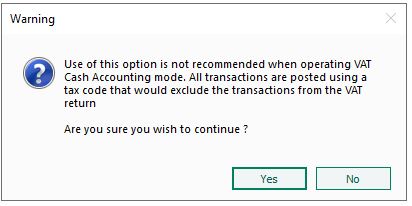
Use this option when you need to write off an entire account. For example, the company has ceased trading and there will be no further activity on the account. NOTE: You can't use this option to write off accounts in a foreign currency.
Customers
This routine allocates together all outstanding transactions on the customer's account.
NOTE: Regardless of which transactions you select in the wizard, it writes off all the transactions on the customer's account.
Original transactions example
| Type | N/C | Details | Date | Ref | Net | Tax | T/C |
|---|---|---|---|---|---|---|---|
| SI | 4000 | Outstanding Invoice | 01/02/2024 | 50.00 | 10.00 | T1 | |
| SI | 4000 | Outstanding Invoice | 01/02/2024 | 50.00 | 10.00 | T1 | |
| SC | 4000 | Outstanding Credit | 01/02/2024 | 50.00 | 10.00 | T1 | |
| SA | 1200 | Payment on Account | 01/02/2024 | 60.00 | 0.00 | T9 |
Suppliers
This routine allocates together the outstanding transactions on the supplier's account. It raises either a purchase invoice or a purchase credit to the Bad Debt Write Off nominal code. This either reduces or increases the supplier's account balance to zero.
For example:
NOTE: Regardless of which transactions you select in the wizard, it writes off all the transactions on the supplier's account.
Original transactions example
| Type | N/C | Details | Date | Ref | Net | Tax | T/C |
|---|---|---|---|---|---|---|---|
| PI | 5000 | Outstanding Invoice | 01/02/2024 | 50.00 | 10.00 | T1 | |
| PI | 5000 | Outstanding Invoice | 01/02/2024 | 50.00 | 10.00 | T1 | |
| PC | 5000 | Outstanding Credit | 01/02/2024 | 50.00 | 10.00 | T1 | |
| PA | 1200 | Payment on Account | 01/02/2024 | 60.00 | 0.00 | T9 |
Use this option to write off outstanding invoice transactions, either individually or in batches. For example, when your customer won't pay one or more invoices, or you won't pay your supplier for one or more invoices. This could be due to a dispute.
NOTE: The write-off wizard doesn't account for VAT. This means that all the automatic transactions post with the non-vatable tax code, T9 by default.
NOTE: You can't use this option to write off foreign currency transactions.
Customers
For each selected invoice selected, this routine posts a sales credit to the Bad Debt nominal code. It also automatically allocates it to the original outstanding sales invoice.
Original transactions example
| Type | N/C | Details | Date | Ref | Net | Tax | T/C |
|---|---|---|---|---|---|---|---|
| SI | 4000 | Outstanding Invoice | 01/02/2024 | 10.00 | 2.00 | T1 | |
| SI | 4000 | Outstanding Invoice | 01/02/2024 | 5.00 | 1.00 | T1 |
Transactions posted by the wizard
| Type | N/C | Details | Date | Ref | Net | Tax | T/C |
|---|---|---|---|---|---|---|---|
| SC | 8100 | Bad Debt Writes Off | Date specified | BADDBT | 12.00 | 0.00 | T9 |
| SC | 8100 | Bad Debt Writes Off | Date specified | BADDBT | 6.00 | 0.00 | T9 |
Suppliers
This routine posts a purchase credit to the Bad Debt nominal code for each invoice you select. It also automatically allocates it to the original outstanding purchase invoice.
Original transactions example
| Type | N/C | Details | Date | Ref | Net | Tax | T/C |
|---|---|---|---|---|---|---|---|
| PI | 5000 | Outstanding Invoice | 01/02/2024 | 10.00 | 2.00 | T1 | |
| PI | 5000 | Outstanding Invoice | 01/02/2024 | 5.00 | 1.00 | T1 |
Transactions posted by the wizard
| Type | N/C | Details | Date | Ref | Net | Tax | T/C |
|---|---|---|---|---|---|---|---|
| PC | 8100 | Bad Debt Writes Off | Date specified | BADDBT | 12.00 | 0.00 | T9 |
| PC | 8100 | Bad Debt Writes Off | Date specified | BADDBT | 6.00 | 0.00 | T9 |
Use this option to write off invoice amounts up to a specified amount. Enter the value to display all outstanding invoices below that value to select from.
NOTE: The write-off wizard doesn't account for VAT. Therefore, all the automatic transactions post with the non-vatable tax code, T9 by default.
NOTE: You can't use this option to write-off foreign currency transactions.
Customers
This routine displays all outstanding sales invoices below the specified value and then raises a sales credit for each invoice selected from the list. The sales credit allocates automatically to the sales invoice.
Outstanding transactions for example
| Type | N/C | Details | Date | Ref | Net | Tax | T/C |
|---|---|---|---|---|---|---|---|
| SI | 4000 | TEST | 01/02/2024 | O/S Invoice | 5.00 | 1.00 | T1 |
| SI | 4000 | TEST1 | 01/02/2024 | O/S Invoice | 3.00 | 0.60 | T1 |
Transactions posted by the wizard
| Type | N/C | Details | Date | Ref | Net | Tax | T/C |
|---|---|---|---|---|---|---|---|
| SC | 8100 | Bad Debt Writes Off | Date specified | BADDBT | 6.00 | 0.00 | T9 |
| SC | 8100 | Bad Debt Writes Off | Date specified | BADDBT | 3.60 | 0.00 | T9 |
Suppliers
This routine displays all outstanding purchase invoices below the specified value, and then raises a purchase credit for each invoice selected from the list. The purchase credit allocates automatically to the purchase invoice.
Original transactions example
| Type | N/C | Details | Date | Ref | Net | Tax | T/C |
|---|---|---|---|---|---|---|---|
| PI | 5000 | Outstanding Invoice | 01/02/2024 | 5.00 | 1.00 | T1 | |
| PI | 5000 | Outstanding Invoice | 01/02/2024 | 3.00 | 0.60 | T1 |
Transactions posted by the wizard
| Type | N/C | Details | Date | Ref | Net | Tax | T/C |
|---|---|---|---|---|---|---|---|
| PC | 8100 | Bad Debt Writes Off | Date specified | BADDBT | 6.00 | 0.00 | T9 |
| PC | 8100 | Bad Debt Writes Off | Date specified | BADDBT | 3.60 | 0.00 | T9 |
Use this option to write off overpayments that exceed the original invoice value or are payments on account. The maximum value you can specify is £/€99.99.
NOTE: The write-off wizard doesn't account for VAT. Therefore, all the automatic transactions post with the non-vatable tax code, T9 by default.
NOTE: You can't use this option to write off foreign currency transactions.
Customers
This routine lists all sales payments on account below the specified value and creates a sales invoice for each payment. The sales invoice allocates automatically to the sales payment on account.
Original transactions example
| Type | N/C | Details | Date | Ref | Net | Tax | T/C |
|---|---|---|---|---|---|---|---|
| SA | 1200 | Payment on Account | 01/02/2024 | 10.00 | 0.00 | T9 |
Transactions posted by the wizard
| Type | N/C | Details | Date | Ref | Net | Tax | T/C |
|---|---|---|---|---|---|---|---|
| SI | 8100 | Bad Debt Writes Off | Date specified | BADDBT | 10.00 | 0.00 | T9 |
Suppliers
This routine lists all purchase payments on account below the specified value and creates a purchase invoice for each payment. The purchase invoice allocates automatically to the purchase payment on account.
Original transactions example
| Type | N/C | Details | Date | Ref | Net | Tax | T/C |
|---|---|---|---|---|---|---|---|
| PA | 1200 | Payment on Account | 01/02/2024 | 10.00 | 0.00 | T9 |
Transactions posted by the wizard
| Type | N/C | Details | Date | Ref | Net | Tax | T/C |
|---|---|---|---|---|---|---|---|
| PI | 8100 | Bad Debt Writes Off | Date specified | BADDBT | 10.00 | 0.00 | T9 |
Related Solutions
Solution Properties
- Solution ID
- 200427112223635
- Last Modified Date
- Thu Feb 05 10:58:09 UTC 2026
- Attributes
-
Product DetailsModules: Accounts
Modules: Customers
Modules: Suppliers
- Views
- 0