

Summary
How to pay a former employee after they have already left in Sage Payroll. Don't use it for final pay or to make an employee a leaver.
Description
Before you begin
Use these steps only after you've completed the employee's final pay and marked them as a leaver.
The steps to pay a leaver depend on why the extra payment is required:
- If you need to correct a previous period then follow steps to amend the affected pay run. For example, you sometimes edit a completed pay run if an employee was underpaid
- If you need to pay money owed after they leave, such as a National Pay Award, then follow the steps below to temporarily activate the leaver record and process the extra payment
Resolution
To temporarily activate the leaver record
- Select Employees from the menu bar.
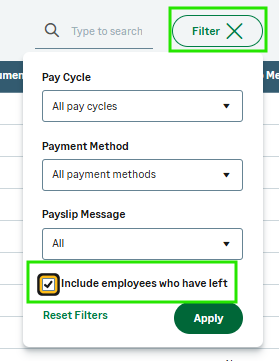
- Select the Filter button and tick the Include employees who have left checkbox.
- Select Apply.
- Choose the employee from the employee list.
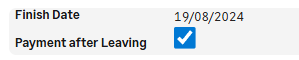
- Under Employment details, select the Payment after leaving checkbox, and select Save.
To process the extra payment
- During the final pay run, proceed to the PAY screen.
- Select the relevant employee.
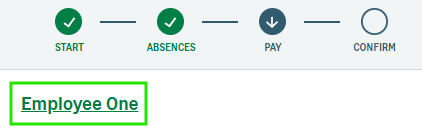
- Once the payments and deductions for that individual appear, select the name of the leaver in green text.
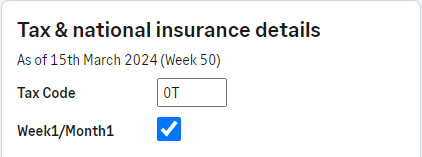
- On the Edit employee details screen, change the Tax Code to 0T (zero T) and tick in the Week1/Month1 box. This ensures the employee doesn't receive any extra tax-free allowance.
- Select Save.
- Pay the employee the required funds, and complete the pay run as usual.
 Africa
 Asia
Asia Australia
 Canada
 France
 Ireland
 Kenya
Kenya Nigeria
 Portugal
 South Africa
 Spain
Spain United Arab Emirates
 United States
 Germany