Pay a former employee after they've left
Summary
How to pay a former employee after they have already left in Sage Payroll. Don't use it for final pay or to make an employee a leaver.
Description
Before you begin
Use these steps only after you've completed the employee's final pay and marked them as a leaver.
The steps to pay a leaver depend on why the extra payment is required:
- If you need to correct a previous period then follow steps to amend the affected pay run. For example, you sometimes edit a completed pay run if an employee was underpaid
- If you need to pay money owed after they leave, such as a National Pay Award, then follow the steps below to temporarily activate the leaver record and process the extra payment
Resolution
To temporarily activate the leaver record
- Select Employees from the menu bar.
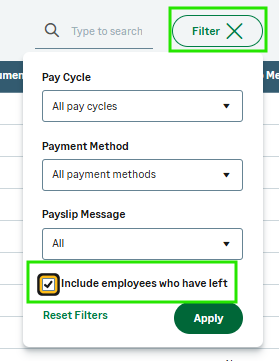
- Select the Filter button and tick the Include employees who have left checkbox.
- Select Apply.
- Choose the employee from the employee list.
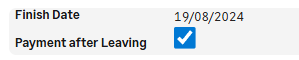
- Under Employment details, select the Payment after leaving checkbox, and select Save.
To process the extra payment
- During the final pay run, proceed to the PAY screen.
- Select the relevant employee.
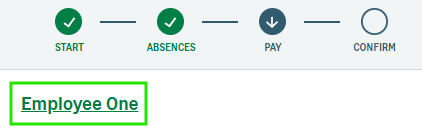
- Once the payments and deductions for that individual appear, select the name of the leaver in green text.
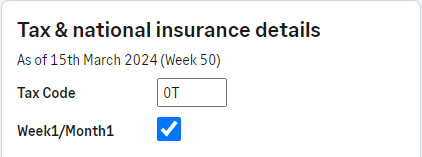
- On the Edit employee details screen, change the Tax Code to 0T (zero T) and tick in the Week1/Month1 box. This ensures the employee doesn't receive any extra tax-free allowance.
- Select Save.
- Pay the employee the required funds, and complete the pay run as usual.
Related Solutions
Solution Properties
- Solution ID
- 222001000101540
- Last Modified Date
- Wed Jul 08 15:10:42 UTC 2026
- Views
- 0