

Summary
How to exclude customers when you send your payment reminders in Sage 50 Accounts v32.1 and above.
Description
Use Manage excluded customers in the Automated Payment Reminders window to stop sending them reminders. This will exclude reminders no matter how overdue their invoice is.
 NOTE: Automated Payment Reminders is only available in Sage 50 Accounts Professional. If you're interested in upgrading, leave your details and we'll be in touch.
Resolution
Manage excluded customers
- Go to Customers then select the Sage Copilot icon.
- Click Debt management in the Debt summary section.
This opens the Debt management with Sage Copilot window.
- Click Manage automated reminders.
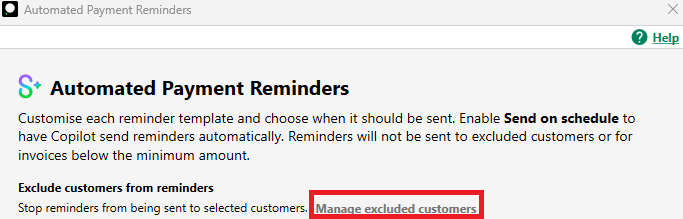
This opens the Automated Payment Reminders window.
- Click Manage excluded customers.
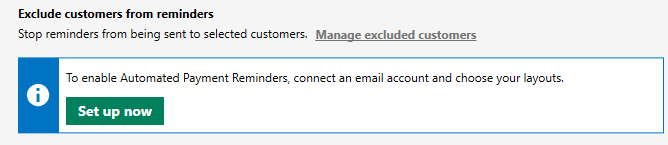
▼ Unable to click Manage excluded customers
If the option is grey, click Set up now to enable Automated Payment Reminders first:
- Select the customers to exclude when you send reminders, then click Save.
NOTE: The software automatically excludes any Disputed transactions on the Debt management with Sage Copilot window. You don't need to include these when you select the customers to exclude.
 Africa
 Asia
 Australia
 Canada
 France
 Ireland
 Kenya
 Nigeria
 Portugal
 South Africa
 Spain
 United Arab Emirates
 United States
 Germany