Modern authentication methods for email
Summary
Information about using Modern authentication when emailing from Sage 50 Accounts.
Description
In September 2024, Microsoft retired basic authentication for webmail. We published guidance on changing your settings and using alternative methods to continue sending emails at the time.
We've released Sage 50 Accounts v31.0 and now support modern authentication methods via Open Authorisation (OAuth) for Microsoft Accounts.
Resolution
 NOTE: We'll be adding support for Gmail in a future update.
Using modern authentication (OAuth)
- Click Settings.
- Select Email Defaults.
- In the Email Client tab, select Webmail from the Email Program list.
- You'll then see the option to select Modern (OAuth) as an authentication method:
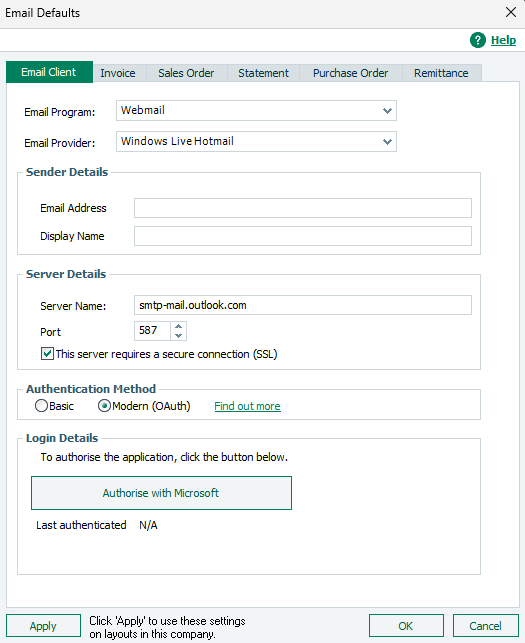
- Select the button in Login Details to authorise your connection.
- After you've logged in through your browser, click Apply.
- Click OK to close the window.
 TIP: These options are also available in Report Designer.
Solution Properties
- Solution ID
- 241108102838610
- Last Modified Date
- Thu Nov 21 09:29:38 UTC 2024
- Views
- 0