

Summary
Steps to take when altering an employee’s tax code for a previously processed pay run in Sage Payroll.
Description
When you edit an employee’s tax code, this will affect all pay runs moving forwards. This will not adjust previous pay runs
Resolution
If you need to alter an employee’s tax code for an already completed pay run, please take the following steps:
- Go to Pay Runs, and select the relevant pay run.
- Select Edit Pay Run.
- Select the relevant employee you want to edit.
- Select the employee’s name underlined at the top of the Pay step.
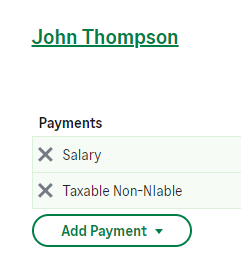
- Adjust the tax code, then select Save.
You should now re-print the employee’s payslip. A PAYE refund or deduction may show in the next pay run. This happens if the employee has overpaid or underpaid tax so far.
Related Solutions
- Read our article Correcting mistakes
 Africa
 Asia
 Australia
 Canada
 France
 Ireland
 Kenya
 Nigeria
 Portugal
 South Africa
 Spain
 United Arab Emirates
 United States
 Germany