

Summary
How to edit pension contribution rates manually in Sage Payroll.
Description
As part of Automatic Enrolment phasing, from 6 April 2019 the total minimum pension contribution rate for your qualifying pension scheme is 8.00% with at least 3.00% coming from the employer.
You can edit and adjust the amount or percentage of contributions for pension scheme members.
 NOTE: Payroll will correctly calculate pre-tax and post-tax deductions. You do not need to adjust the percentage amounts to allow for a pre or post tax calculation.
Resolution
How to check or edit an employee’s pension contribution details
- Process the pay run as normal until the Edit Pay stage.
- Click on the relevant employee.
- Click the pension deduction.
- Confirm the Employee Standard Contribution and Employer Standard Contribution percentages are correct, changing them if not.
- If the employee wants to make an additional voluntary contribution, click Yes in the Deduct Additional Voluntary Contribution drop-down list, then complete the frequency and type details as required.
- Click Save.
Employee deductions differ from those expected
The pension deductions taken from your employees may not be the amounts you expect.
The percentages are not the only factor used in calculating the deduction.
You will need to check the following with your pension provider.
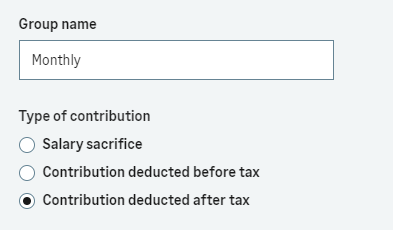
Type of contribution:-
- Salary Sacrifice
- Contribution deducted before tax
- Contribution deducted after tax
What earnings basis are the contributions deducted from?
- Unbanded earnings
- Banded earnings
- Custom earnings basis
Once you have the above information, enter it into payroll as follows:-
- Select Pensions.
- Find your pension scheme and select Edit Pension.
- Next to the Group name, select View/Edit.
- Select the required option.
- Select Next.
- Select the required option.

- Select Save.
- Select Save again.
Related Solutions
Please also read our article Common pension terms.
 Africa
 Asia
 Australia
 Canada
 France
 Ireland
 Kenya
 Nigeria
 Portugal
 South Africa
 Spain
 United Arab Emirates
 United States
 Germany