Print multiple invoices at the same time
Summary
How to print a single invoice or multiple sales invoices at the same time in Sage Accounting.
Resolution
Before you start
You have 2 options for printing off invoices:
- You can have a breif breakdown of invoices you have selected on your Sales list.
- You can see an in detailed of each Invoice selected from the sales list.
Print breif invoices
- Go to Sales then click Sales Invoices.
- Select the check boxes next to the invoices you want to print.
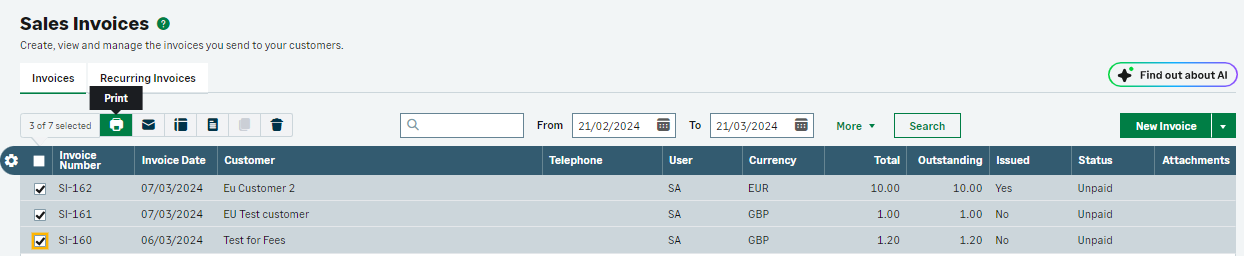
- From the ction toolbar, click the Print button.
- Depending on your Internet browser, the invoice opens in a new window or tab.
- Open your browser’s File menu, then choose to either print or save the document.
Print full invoices
- Go to Sales then click Sales Invoices.
- Select the check boxes next to the invoices you want to print.
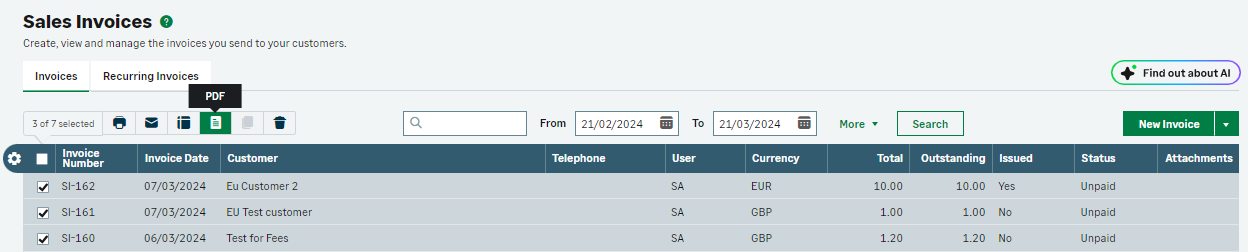
- From the action toolbar, click the PDF button.
- Depending on your Internet browser, the invoice opens in a new window or tab.
- Open your browser’s File menu, then choose to either print or save the document.
 NOTE: If multiple invoices have been selected for different business's they will all be included on the same PDF file
Related Solutions
Solution Properties
- Solution ID
- 222001000101153
- Last Modified Date
- Wed May 29 14:54:08 UTC 2024
- Views
- 0