The Trial balance report
Summary
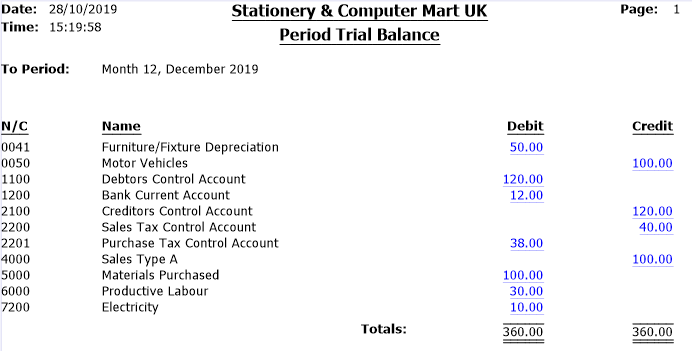
The Trial balance report in Sage 50 Accounts shows each nominal code balance up to a set period. The balances display as balancing debits and credits.
Description
The period Trial balance report shows a list of all nominal codes with a value in a period you select. It gets its figures from the period values of each nominal code record.
Resolution
Run a Trial balance report
- Click Nominal codes.
- Click Trial balance then click Preview.
- Click Run and select the required period.
- Click OK.
Example Trial balance report layout
To find out further information about each field in the report, hover your mouse over each section.
Related Solutions
Upgrade your licence
Growing business? Add more companies, users, or employees to your licence with ease. Leave your details and we’ll be in touch.

Solution Properties
- Solution ID
- 200427112357142
- Last Modified Date
- Fri Aug 28 14:24:28 UTC 2026
- Attributes
-
Product DetailsModules: Financials
- Views
- 0