

Summary
How to assign income tax categories for Making Tax Digital (MTD) for Income Tax in Sage 50 Accounts v33.1 and above.
Description
You need to set income tax categories on Profit and Loss nominal codes so you can send your MTD for Income Tax quarterly updates.
When you submit your quarterly update, you'll see two sections, Business income and Business expenses. For more information on the categories in each section, see our Making Tax Digital for Income Tax category list article.
The categories in the Assign Nominal Codes to Income tax Categories window relate to the areas in your Chart of Accounts.
These are:
- Sales
- Purchases
- Direct Expenses
- Overheads
- Taxation
Resolution
Before you start
- You'll need to set up Making Tax Digital for Income Tax in the software first
- Create any new nominal codes in the nominal codes wizard option
You can also add the categories in the wizard. Otherwise follow the assign the categories section below
Assign the categories
- Log in to Sage 50 Accounts as Manager or a user with full access to the Nominal codes module.
-
Go to Nominal codes then select Assign Income Tax categories.
-
Select the relevant category in the Income tax category dropdown against the nominal code Name.
In Sage 50 Accounts v34 and above, you can use the Search function to narrow down the list of categories on this window.
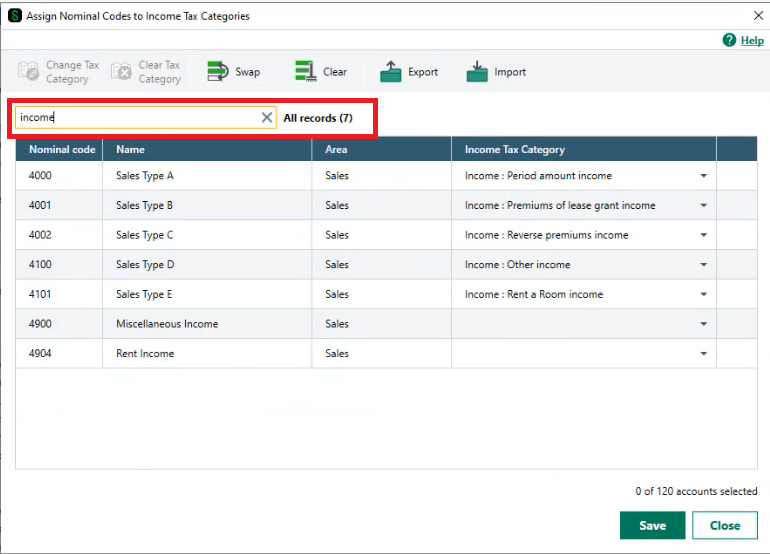
- Select Save once you've assigned your categories.
Next steps
Follow our submit quarterly update window article.
 Africa
 Asia
Asia Australia
 Canada
 France
 Ireland
 Kenya
Kenya Nigeria
 Portugal
 South Africa
 Spain
Spain United Arab Emirates
 United States
 Germany