E-Banking error "Barclays.Net file is in the wrong format" Sage 200
Summary
When trying to upload a file created from Barclays Business Master lite plugin Barclays rejects the file as it is incorrectly formatted.
Description
If you use Barclays Business Master banking software with e-banking, the Barclays.Net file that's created is in the wrong format. Therefore, it cannot be uploaded to Barclays.
For the Barclays.net file to be accepted, each field should be wrapped in double quotation marks " ", however these are currently missing.
Resolution
This issue is currently under investigation.
However,as a workaround, you can amend the payment file to the correct format using the steps below:
- Locate the payment file and then right click and then click Open with and click Notepad.
- Enter the missing quotation marks. If you have over 100 Payments this can be quite labour intensive, so a quicker way is to Click Edit and then Replace. Replace comma (,) with the following "," this will then add the quotation marks inbetween the text. Then you will need to add quotation marks to the begining and end of each row.
- Click File then click Save, then click File and click Exit.
Currently each line will look like this:
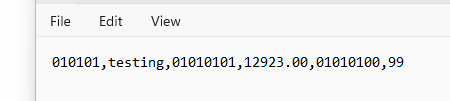
After inserting quotation marks, it will look like this and will then be accepted as a format:

Solution Properties
- Solution ID
- 240618082528150
- Last Modified Date
- Thu Jun 20 11:42:01 UTC 2024
- Views
- 0