Deferred VAT payments
Summary
Resolution
UPDATED 04 November 2022
If you deferred VAT payments due between 20 March 2020 and 30 June 2020 and still have payments to make, you can:
- Pay the deferred VAT in full, on or before 31 March 2021
- Pay in 11 instalments. To do this you must first join the VAT deferral new payment scheme. To sign up, go to Pay VAT deferred due to coronavirus on GOV.UK
- Contact HMRC on Telephone: 0800 024 1222 by 30 June 2021 if you need extra help to pay
You may be charged interest or a penalty if you do not:
- Pay the deferred VAT in full by 31 March 2021
- Opt into the new payment scheme by 21 June 2021
- Agree extra help to pay with HMRC by 30 June 2021
Pay your deferred VAT in full
If you want to pay your deferred VAT in full by 31 March 2021, send the payment for the full amount to HMRC as usual.
Once you have paid HMRC, you'll need to record the payment in Accounting and match it to your unpaid VAT Returns.
There are different ways to this depending on whether you import bank transactions from a bank feed or your bank statement.
When you show your VAT Returns as paid in Sage Accounting, we create the corresponding payments in the relevant bank account.
Depending on whether you submit VAT Returns monthly or quarterly, you could have up to four unpaid VAT Returns.
For example, we have deferred VAT payments for April, May and June, so we now have 3 unpaid monthly VAT Returns. To make the numbers easier, these are for £60, £40 and £40, making a total of £140.
We've already paid HMRC so we have a £140 payment showing in our real bank account.
Mark your VAT Returns as paid
First we'll mark the VAT Returns as paid in Sage Accounting.
- From Reporting, select VAT Returns.
- Open each unpaid return and select Pay.
- Choose the bank account the payment was made from, and 'pay' the full outstanding amount.
A bank payment is added to the relevant bank account. In our case this will be three payments of £60, £40 and £40.
Reconcile or match the VAT payments to your bank statement
If you import bank transactions either from a bank feed or statement import, simply match the single payment to HMRC imported from your bank to the smaller payments you've just recorded. In our case we'll match £140, to the VAT payments of £60, £40 and £40.
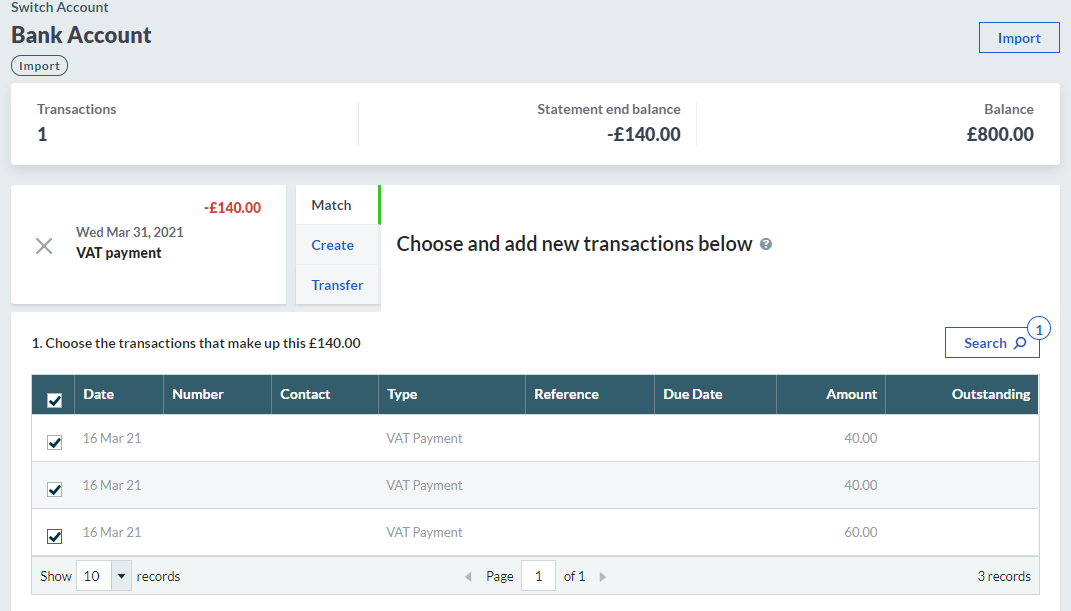
If you manually reconcile your bank account, just remember that the payment to HMRC should be reconciled with the smaller VAT payments recorded in Sage Accounting.
Pay deferred VAT in 11 instalments
The deferred VAT, originally due in March 2021, can now be spread out as 11 smaller repayments with no interest to pay. Once you have registered with HMRC to pay in instalments, you'll need to record these in Sage Accounting and mark your VAT Returns as paid.
In our example, we owe HMRC £140. As we have registered in April, we can split this into 10 payments of £14 each.
Mark your VAT Returns as paid
First we'll mark the VAT Returns as paid in Sage Accounting.
- From Reporting, select VAT Returns.
- Open each unpaid return and select Pay.
- Choose the bank account the payment was made from, and record the amount of the first instalment. In our case this will be £14.
- The VAT Return will show as Part paid.
- Repeat this process each time you pay a VAT instalment, until all your deferred VAT Returns are showing as paid.
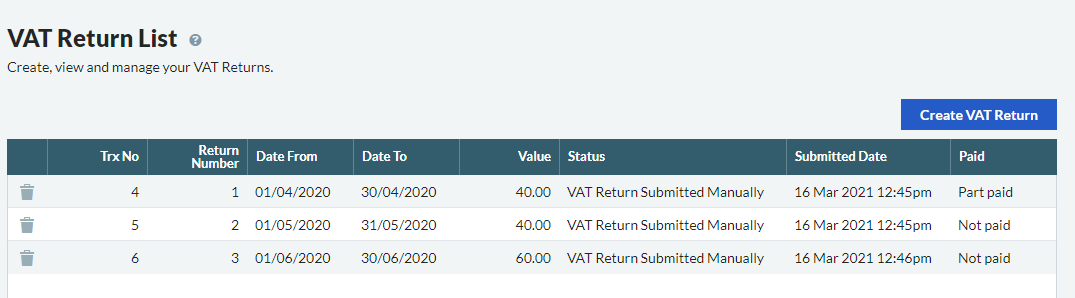
A bank payment is added to the relevant bank account. In our case this will be separate payments of £14 each.
Reconcile or match the VAT payments to your bank statement
If you import bank transactions either from a bank feed or statement import, simply match each instalment with the VAT payments you have just recorded.
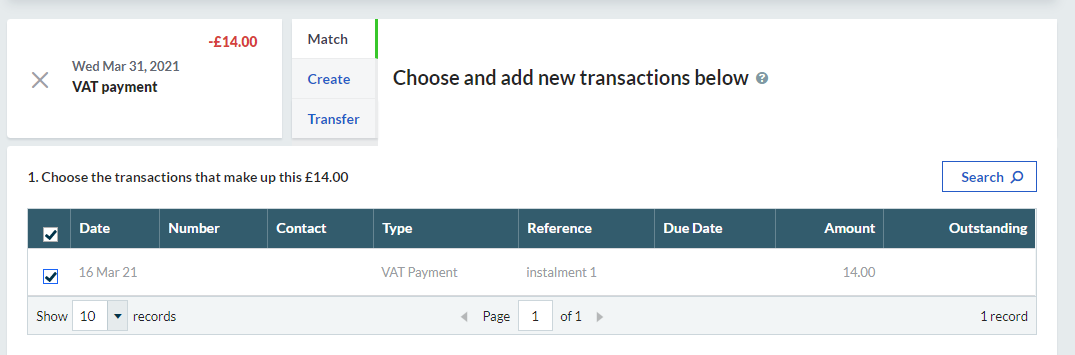
If you manually reconcile your bank account, just reconcile the payments showing in your bank account with the corresponding payments in Sage Accounting.
Related Solutions
Solution Properties
- Solution ID
- 222001000101307
- Last Modified Date
- Tue Mar 03 13:41:43 UTC 2026
- Views
- 0