Change a supplier opening balance
Summary
Description
You may have entered a wrong supplier opening balance or entred a balance in error. Open the opening balance transaction to change or delete it.
If you have paid or allocated the opening balance, you must unallocate the payment first. You can then change it.
Resolution
Amend or delete an opening balance
- Go to Settings, then Business Settings. Scroll down to the Opening Balances section.
- Select Supplier.
- To edit an opening balance, select the opening balance transaction. Make the necessary changes and Save.
- You can delete an opening balance. Select the Delete
 button next to the relevant opening balance transaction.
My opening balance has been allocated / paid
If it's already allocated, you can't edit the opening balance
For opening balance invoices, this means the customers paid the invoice.
For opening balances that are credit notes, you’ve allocated the credit note to an invoice or a refund.
Before you edit the opening balance, you need to unallocate it.
Unallocate an opening balance invoice
- Go to Contacts, then select Suppliers. Select the relevant supplier.
- Open the payment that's allocated to the opening balance.
- Remove the tick from the Opening balance and Save.
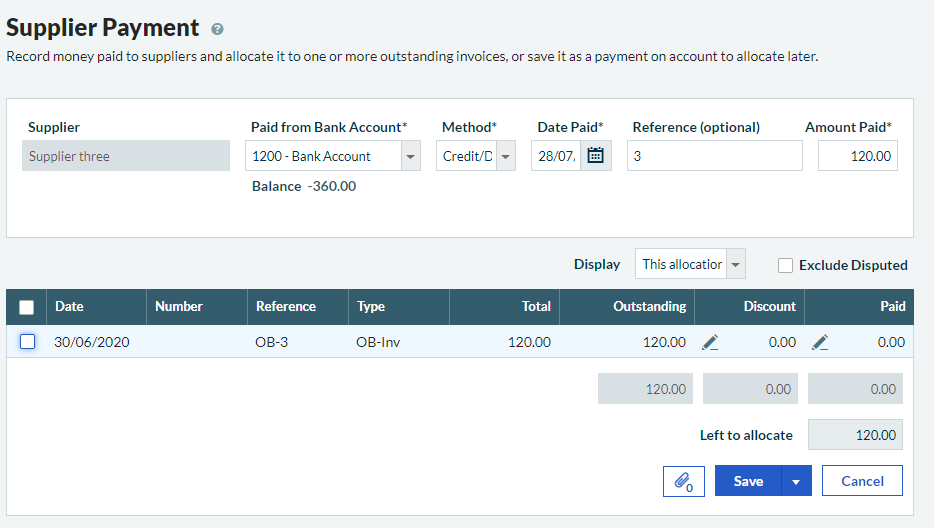
You're shown a message asking if you want to save the payment as a payment on account. Choose Yes. You can then re-allocate the payment to the amended opening balance later.
Unallocate a refund
You can only create refunds for the exact amount of the credit note they are paying. You must delete the refund rather than unallocate it.
Once you've amended the opening balance, you can re-enter the refund if required.
- Go to Banking, then select the relevant bank account.
- From the Activity tab, select the check box next to the refund.
- Select Delete.

Related Solutions
Solution Properties
- Solution ID
- 222001000101277
- Last Modified Date
- Wed Mar 13 13:36:55 UTC 2024
- Views
- 0