

Summary
How to send customer statements in bulk from Sage Accounting.
Description
Use the bulk send option on the customer list to send statements to selected customers quickly.
When you send statements this way, you can:
- Choose which customers to include
- Set the date range for the statements
- Draft the email with Copilot (if you subscribe) or customise it yourself
- Track delivery. We’ll notify you if an email isn’t delivered
Resolution
Send statements in bulk
- Go to Contacts, then Customers.
- Use the checkboxes to select the customers you want to send statements to.
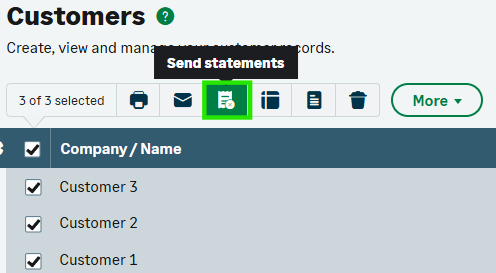
- Select Send statements. See the screenshot below for reference.
-
- Choose the criteria for which customers to include:
- Include customers with a zero balance – this adds customers who have no outstanding balance
- Include customers with a negative balance – this adds customers where you owe them money (for example, credit balances). These options affect which customers appear in the statement run
- Review the list to see why some statements won’t be sent.
- Draft the email:
- If you have Copilot, use it to draft the email message
- If not, write your own message and choose who to send the emails to
- Select Send [x] statements to finish.
 Africa
 Asia
Asia Australia
 Canada
 France
 Ireland
 Kenya
Kenya Nigeria
 Portugal
 South Africa
 Spain
Spain United Arab Emirates
 United States
 Germany