VAT rate guide
Summary
Resolution
We always do our best to make sure the information is correct, but we can’t make any guarantees that it suits your particular needs. If you need specific help on your individual circumstances, you should consider taking professional advice. To ensure you use the correct VAT rate in Accounting, always check with HMRC which boxes you need values to appear in.
Start
Is the transaction a sale or a purchase?
Sale of goods from NI
Are you selling to a customer in the EU or the rest of the world?
Sale of goods overseas
Is your business registered in Great Britain (England, Scotland or Wales) or Northern Ireland?
Sale of goods in the UK and subject to VAT
If VAT is due on the sale of goods, you can use one of the following rates depending on how much VAT you need to charge:
- Standard – VAT calculates at 20%.
- Lower Rate – VAT calculates at 5%.
The VAT appears in box 1 on your VAT Return and the net amount in box 6.
Sale of Goods in the UK with no VAT
If no VAT is due on the sale of goods, you can use one of the following rates:
Zero Rated – VAT calculates at 0%
Exempt – The transaction is exempt from VAT.
The net amount appears in box 6 on your VAT Return. If you’re not sure whether an item is zero rated or exempt from VAT, read this HMRC guide.
Sale of goods from NI to the EU
Is the customer registered for VAT?
If the customer is registered for VAT, check you’ve entered the correct country and VAT number in the customer contact record.
To check this:
- From Contacts, select Customers and select the required customer.
- From the Options tab, check the VAT number is correct.
- From the Addresses tab, check the country is correct.
Sale of goods from NI to a VAT registered customer in the EU
The VAT rate defaults to zero rated. You can’t change this.
For each item line on the invoice, select EU Goods/Services, then Goods (and related services).
The value of the invoice appears in boxes 6 and 8 on the VAT Return.
Sale of Goods from NI to customer in the EU who is not VAT registered
If the customer isn’t registered for VAT, use the same VAT rate as you would if you sold the item in the UK.
If applicable, the VAT then appears in box 1 and the net amount in box 6 on the VAT Return.
Sale of goods to the rest of the world
The VAT rate defaults to zero rated. You can’t change this.
For each item line on the invoice, select EU Goods/Services, then Goods (and related services).
The value of the invoice appears in boxes 6 on the VAT Return.
Sale of services
Is it a sale of services to the UK, EU or the rest of the world?
Sale of services within the UK
There are a number of grey areas and complexities associated with the supply of services and VAT. If you need more information about what VAT rate to use, please contact HMRC National Advice Service Helpline on 0845 010 9000, your local HMRC office or visit their website at www.hmrc.gov.uk
Depending on the response from HMRC, you can use one of the following rates:
| Rate | How it affects the VAT Return |
| Standard | The VAT appears in box 1 and the net in box 6. |
| Lower Rate | The VAT appears in box 1 and the net in box 6. |
| Zero Rated | The net appears in box 6. |
| Exempt | The net appears in box 6. |
| No VAT | The transaction doesn’t appear on the VAT Return. |
Sale of services to the EU
Is the customer registered for VAT?
If the customer is registered for VAT, make sure you enter the correct country and VAT number in their contact record. To check this:
- From Contacts, select Customers and open the required customer.
- From the Options tab, check the VAT number is correct.
- From the Addresses tab, check that the country is correct.
Sale of services to a VAT registered customer in the EU
The VAT rate defaults to zero rated. You can’t change this.
For each item line on the invoice select EU Goods/Services, then Services (standalone).
The value of the invoice appears in box 6 on the VAT Return.
Sale of services to non-VAT registered customer in the EU
If the customer isn’t registered for VAT, you should post the transaction using the same VAT rate you would use if you sold the item in the UK.
If applicable, the VAT then appears in box 1 and the net amount in box 6 on the VAT Return.
Sale of services to the rest of the world
If you enter a country outside the EU in the customer’s record, the VAT rate defaults to zero rated . You can’t change this.
For each item line on the invoice select EU Goods/Services, then Services (standalone).
The net amount then appears in box 6 on the VAT Return.
Import goods to NI
Are your buying goods from the EU or the rest of the world?
Purchase of goods in UK that are subject to VAT
If VAT is due on the purchase of goods, you can use one of the following rates depending on how much VAT is due:
- Standard – VAT calculates at 20%.
- Lower Rate – VAT calculates at 5%.
The VAT appears in box 4 on your VAT Return and the net amount in box 7.
Purchase of goods in the UK with no VAT
If no VAT is due on the purchase of goods, you can use one of the following rates:
Zero Rated – VAT calculates at 0%
Exempt – The transaction is exempt from VAT.
The net amount appears in box 7 on your VAT Return. If you’re not sure whether an item is zero rated or exempt from VAT, read this HMRC guide.
Import goods into NI from the EU
Has the supplier provided you with their VAT registration number?
If the supplier is registered for VAT, you must ensure you’ve entered the correct country and VAT number in their record. To check this:
- From Contacts, select Suppliers, then the required supplier.
- From the Options tab, check the VAT number is correct.
- From the Addresses tab, check the country is correct.
Purchase of goods from the EU when the supplier has a VAT registration number
If the supplier is registered for VAT, use the VAT rate you would use if you purchased the item in the UK. VAT is then charged under the reverse charge mechanism.
| Rate | How it affects the VAT Return |
| Standard | The notional VAT appears in boxes 2 and 4. The net appears in boxes 7 and 9. |
| Lower Rate | The notional VAT appears in boxes 2 and 4. The net appears in boxes 7 and 9. |
| Zero Rated | The net appears in boxes 7 and 9. |
| Exempt | The net appears in boxes 7 and 9. |
| No VAT | The transaction doesn’t appear on the VAT Return. |
For each item line on the invoice select, EU Goods/Services, then Goods (and related services).
Purchase of goods from the EU when the supplier is not VAT registered
Did the supplier charge foreign VAT on the goods?
Purchase > Goods > EU > Supplier hasn’t provided their VAT registration number > Foreign VAT is due
If the supplier has charged VAT on the goods purchased at the country of origin rate, you must show this on your invoice, but not on your VAT Return.
For example, if you purchase goods from a German supplier at the standard rate, the VAT is 19%. In this case, the VAT Return needs to show the net amount in box 7. You don’t need to include the foreign VAT you paid, however you should still enter this so the invoice is for the correct value.
To enter this in Accounting, post the invoice with two separate item lines. One for the net amount at zero rate and the other for the VAT amount. To ensure the VAT doesn’t appear on your return, you must enter this as a net value. For example if you bought an item for €119.00 from a German supplier, you would post the following:
| Ledger Account* | Qty | Unit Price* | VAT Rate* | VAT |
| Cost of sales – goods (5000) | 1 | 100.00 | Zero Rated | 0.00 |
| Cost of sales – goods (5000) | 1 | 19.00 | No VAT | 0.00 |
The net value then appears in box 7 on your VAT Return and the foreign VAT isn’t included.
Purchase of goods from the EU where the supplier is not VAT registered and no VAT is charged
If no VAT is due on the purchase of goods, use Zero Rated. The net amount appears in box 7 on your VAT Return.
Import of goods from the rest of the world
If you’ve entered a country outside the EU in the customer’s record, the VAT rate defaults to zero rated. You can’t change this.
For each item line on the invoice select, EU Goods/Services, then Goods (and related services).
The net amount then appears in box 7 on the VAT Return.
Purchase of goods from the rest of the world
Is your business registered in Great Britain (England, Scotland or Wales) or Northern Ireland?
Purchase of goods from outside the UK
Is the purchase for more or less than £135?
Imported goods up to the value of £135 are liable for domestic VAT rather than import VAT.
VAT is not charged but needs to be declared on the VAT Return - the reverse charge mechanism.
The £135 limit is based on the total value of the goods sold and:
Excludes transport and insurance costs, unless included in the price and not separately indicated on the invoice.
Excludes additional taxes and charges identifiable by the customs authorities from any relevant documents.
Applies to the total consignment value, not individual items within the consignment.
If the total consignment value is over £135 then normal VAT and customs rules apply and import VAT is chargeable (create the purchase invoice without selecting the check box)
Purchase of goods over £135
Do you want to use postponed accounting?
Postponed accounting enables you to declare and recover import VAT on the same VAT Return, rather than paying import VAT on or soon after the goods arrive at the UK border.
For more information, read our use postponed accounting for import VAT and duty for GB businesses article
Purchase of goods worth less than £135
Imported goods up to the value of £135 are liable for domestic VAT rather than import VAT - the VAT is paid at the point of sale by the consumer.
- Select the supplier and enter the details as usual.
Select the check box to indicate that the invoice value is less than £135.
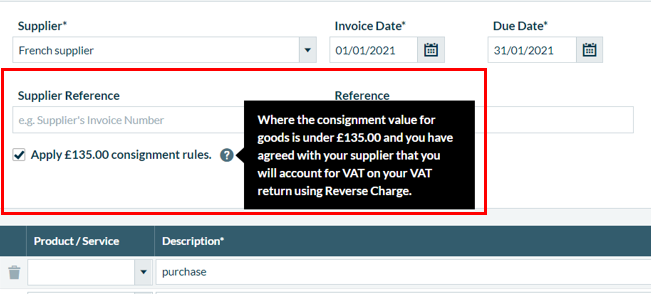
If your supplier has an address outside the UK, the VAT will be set to zero. To account for the VAT as both input and output VAT on your VAT Return, select the usual VAT rate, then select whether it's for goods or services on each line.
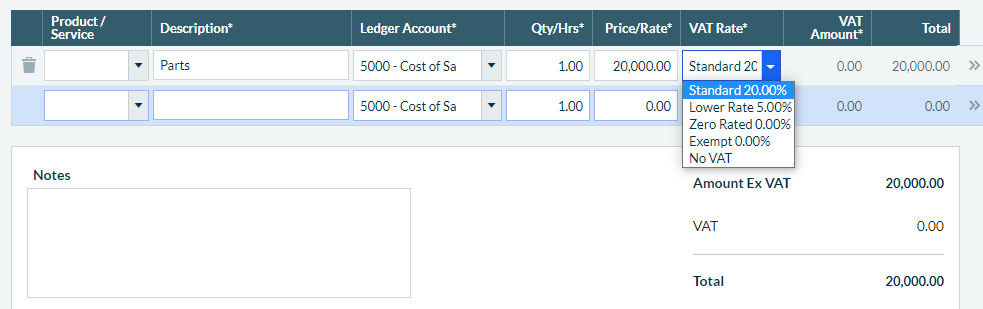
The VAT appears in boxes 1, 4 and 7 of the VAT Return.
Use postponed accounting for purchase of goods from outside the UK worth more than £135
Change the VAT Rate to Standard or Lower Rate as required.
For each item line on the invoice, select EU Goods/Services, then Goods (and related services).
This automatically applies postponed VAT on your invoice. Although VAT is not shown on the invoice, we estimate the VAT for you and record the VAT in box 1 and 4 on the VAT Return. The net amount is reported in box 7.
For more information about using postponed accounting , read our use postponed accounting for import VAT and duty for GB businesses article.
Don't use postponed accounting
Leave the VAT rate as the default of zero rated.
For each item line on the invoice select, EU Goods/Services, then Goods (and related services).
The net amount then appears in box 7 on the VAT Return.
Record the import VAT when you receive the statement from HMRC or when you are charged by your import agent.
Purchase > Services
Is it a purchase of services from the UK, EU or the rest of the world?
Purchase of services within the UK
Did the supplier charge you VAT on the purchase?
Purchase of services within UK and subject to VAT
If VAT is due on the purchase of services, you can use one of the following rates depending on how much VAT is due:
- Standard – VAT calculates at 20%.
- Lower Rate – VAT calculates at 5%.
The VAT appears in box 4 on your VAT Return and the net amount in box 7.
Purchase of services within the UK with no VAT
If no VAT is due on the purchase of goods, you can use one of the following rates:
Zero Rated – VAT calculates at 0%
Exempt – The transaction is exempt from VAT.
The net amount appears in box 7 on your VAT Return .If you’re not sure whether an item is zero rated or exempt from VAT, read this HMRC guide.
Purchase of services from the EU
Is the supplier registered for VAT?
If the supplier is registered for VAT, you must ensure you enter the correct country and VAT number in their record. To check this:
- From Contacts, select Suppliers, then the required supplier. Check the VAT number is correct, then to check the country, select Addresses.
Purchase of services from the EU where the supplier is VAT registered
There are a number of grey areas and complexities associated with the purchase of services and VAT. If you need more information about what VAT rate to use, please contact HMRC National Advice Service Helpline on 0845 010 9000, your local HMRC office or visit their website at www.hmrc.gov.uk
 TIP: VAT calculates under the reverse charge mechanism. It is important you refer to HMRC or VAT Notice 741 Place of supply of services, as there are many different situations where notional VAT applies.
Depending on the response from HMRC, choose one of the following rates:
| Rate | How it affects the VAT Return |
| Standard | The VAT appears in boxes 1 and 4. This is notional VAT. No VAT is paid or reclaimed, the same value appears in boxes 1 and 4, cancelling each other out. The net appears in boxes 6 and 7. |
| Lower Rate | The VAT appears in boxes 1 and 4. The net appears in boxes 6 and 7. |
| Zero Rated | The net appears in boxes 6 and 7. |
| Exempt | The net appears in box 7. |
| No VAT | Use if the service is outside the scope of UK VAT. The transaction doesn’t appear on the VAT Return. |
For each item line on the invoice, select EU Goods/Services, then Services (standalone).
Purchase of goods from the EU where the supplier isn’t VAT registered
Did the supplier charge foreign VAT on the service?
Purchase > Goods > EU > Supplier isn’t VAT registered > Foreign VAT is due
If the supplier has charged VAT on the service purchased at the country of origin rate, you must show this on your invoice, but not on your VAT Return.
For example, if you purchase services from a German supplier at the standard rate, the VAT is 19%. In this case, the VAT Return needs to show the net amount in box 7.
To enter this in Accounting, post the invoice with two separate item lines. One for the net element at zero rate and the other for the VAT element. To ensure the VAT doesn’t appear on your return, you must enter this as a net value. For example if you bought an item for €119.00 from a German supplier, you would post the following:
| Ledger Account* | Qty | Unit Price* | VAT Rate* | VAT |
| Cost of sales – goods (5000) | 1 | 100.00 | Zero Rated | 0.00 |
| Cost of sales – goods (5000) | 1 | 19.00 | No VAT | 0.00 |
The net value then appears in box 7 on your VAT Return and the foreign VAT isn’t included.
Purchase > Goods > EU > Supplier isn’t VAT registered > No VAT
If no VAT is due on the purchase of the service, use Zero Rated. The net appears in box 7 on your VAT Return.
Purchase of goods from the rest of the world
If you’ve entered a country outside the EU in the supplier’s record the VAT rate defaults to Zero Rated. You can’t change this.
For each item line on the invoice, selectEU Goods/Services, then choose services (standalone).
The invoice is then charged under the reverse charge mechanism and the net amount appears in boxes 6 and 7 on the VAT Return.
Purchase of services from the rest of the world
There are a number of grey areas and complexities in relation to VAT and the purchase of services. Because of this, please contact HMRC National Advice Service Helpline on 0300 200 3700, contact your local HMRC office or visit their website at www.hmrc.gov.uk to establish the VAT liability of the supply.
Depending upon the response provided by HMRC, the transaction would be posted in one of the following ways:
Treat as a UK purchase – standard rate
Use the Standard VAT rate.
The tax amount appears in box 4 and the net amount appears in box 7.
Foreign VAT has been charged on the supply
The supplier has charged VAT at the country of origin rate, for example, Ireland at 23%.
The invoice must be posted as two separate transactions:
- Post the net element using Zero Rated VAT rate.
- Post the VAT element using No VAT rate and enter the VAT amount in the Net column.
The net amount appears in box 7.
The service is outside the scope of UK VAT
Use No VAT.
This doesn’t affect the VAT Return.
Solution Properties
- Solution ID
- 222001000100670
- Last Modified Date
- Fri Jun 23 11:40:18 UTC 2023
- Views
- 0