Check the invoice for your subscription
Summary
Resolution
This explains how to access the invoice we send you with details of the monthly charges for your subscription.
Subscription invoices can only be accessed by the Business Owner. Depending on when you signed up with us, we'll either send your invoice by email to the business owner on your account, or add your invoice to the Business Account area of Sage Accounting.
If you signed up via Apple, you'll find your invoice in your Apple Wallet. More about Apple subscriptions.
Every month, we'll send you an invoice with the details of your subscription. This includes a breakdown of the products you subscribe to, the period of subscription charges and VAT.
The Business Owner is the person who first registered with us, and the only user who can access your invoice. If you're logged in as the business owner, you'll see (Owner) shown next to the company name at the top of the screen.
Find your invoices
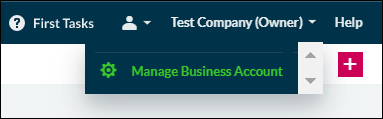
From the dropdown next to your company name, select Manage Business Account.
- Select the Subscription & Invoices tab.
From the Sage Invoices section, select Subscriptions and invoices.

- Select the invoice you want to view. Depending on your Internet browser, the invoice appears in a new tab or new window. You can download, print or save the invoice from your Internet browser menu bar.

Can't see the View My Invoices option?
If the View my Invoices button is not displayed and a message saying Sorry this information is currently unavailable is shown instead, then your monthly invoices are attached to email we send you each month.

Ask us about your invoice
If you have questions about your subscription or your invoice, contact our subscription team via webchat.

Online chat
Chat online to one of our Sage experts, Monday to Friday between 9am and 5pm, to help find the right solution for you.
Not using the email address your Sage invoices are sent to
If you're no longer using this email address or want to change it to a different one, see Change your email address
Solution Properties
- Solution ID
- 222001000100355
- Last Modified Date
- Thu Jun 22 13:49:08 UTC 2023
- Views
- 0