

Summary
How to change your company details in Sage 50 Accounts.
Description
If you need to edit your company name, address, email address or website, you can change these details in your software.
Resolution
 NOTE: If you're using Remote Data Access in Sage 50 Accounts v27.2, you can only amend the company name, address, telephone number and VAT registration number at the main site.
It's quick and easy to make these changes:
- On the menu bar, click Settings then click Company Preferences.
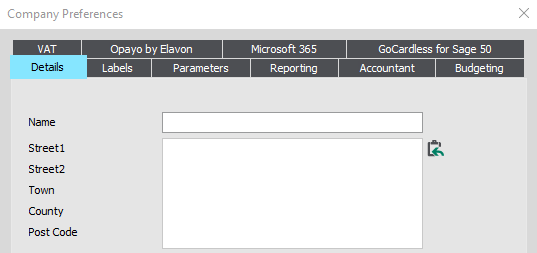
- In the Details tab, enter your new details as required.
- Once done, click OK.
NOTE: If the OK button is off screen, this is because of your screen resolution. To resolve this - Read more >
 More support and information is available
Get the most out of your software, stay ahead with trending topics and get answers from thousands of articles using the Sage Knowledgebase. Visit the Help Centre >
 Africa
 Asia
Asia Australia
 Canada
 France
 Ireland
 Kenya
Kenya Nigeria
 Portugal
 South Africa
 Spain
Spain United Arab Emirates
 United States
 Germany