

Summary
Description
Before you start submitting your VAT Returns, make sure that the settings in Sage 50 Accounts are correct for your business.
Resolution
- On the menu bar click Settings, click Company Preferences then click the VAT tab.
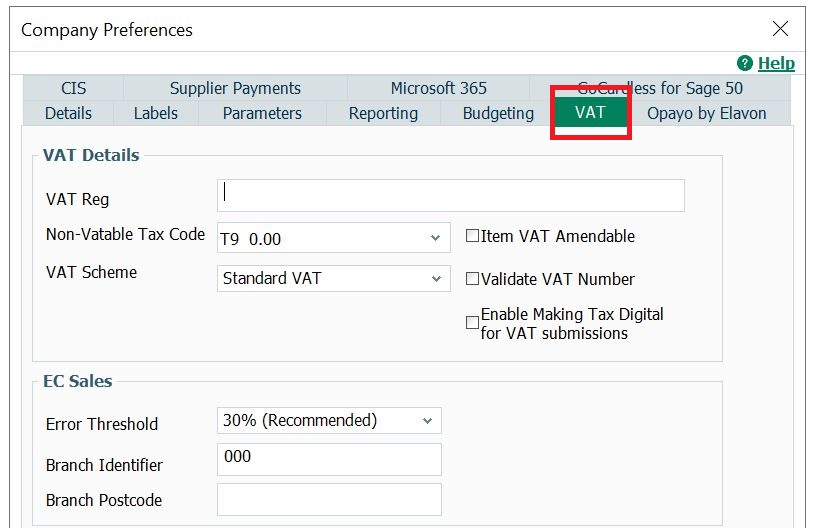
- Check that the following settings are correct:
There are more VAT settings you may also find useful.VAT Reg Your company VAT Registration number.
Non-Vatable Tax Code
The tax code you use for transactions that don't involve VAT, T9 by default. Transactions posted using this tax code don't appear on the VAT Return.
This must be a tax code that isn't included on the VAT Return in Settings, Configuration.
VAT Scheme
The VAT scheme your company is using. Sage 50 Accounts allows you to use the following VAT schemes:
- Standard VAT
- VAT Cash Accounting
- Flat Rate - Invoiced Based (UK based only)
- Flat Rate - Cash Based (UK based only)
Flat Rate
If you've selected a Flat Rate VAT scheme, enter the VAT rate percentage from HMRC.
Enable Making Tax Digital for VAT submissions
Before your first submission under Making Tax Digital you must select this check box.
HMRC Payments
If you use Sage e-banking to pay your VAT liability, enter the HMRC bank account details.
- To confirm your VAT settings, click OK.
Find out more about MTD
- Watch our free MTD webinar
- Sage Making Tax Digital Help Centre
- MTD Checklist for Sage 50 Accounts
- GOV.UK - Making Tax Digital for VAT
Upgrade your licence
Growing business? Add more companies, users, or employees to your licence with ease. Leave your details and we’ll be in touch.

 Africa
 Asia
 Australia
 Canada
 France
 Ireland
 Kenya
 Nigeria
 Portugal
 South Africa
 Spain
 United Arab Emirates
 United States
 Germany