Prerequisites for Sage 200 Professional
Summary
Information on how to check that all prerequisites are met prior to attempting an install of the Sage 200 Professional software.
Description
Before you install Sage 200, you must make sure the required prerequisites are installed on your system.
You must also make sure that your installations of Microsoft SQL Server and Microsoft Internet Information Services (IIS) have the required settings.
Resolution
Use the Prerequisite tool
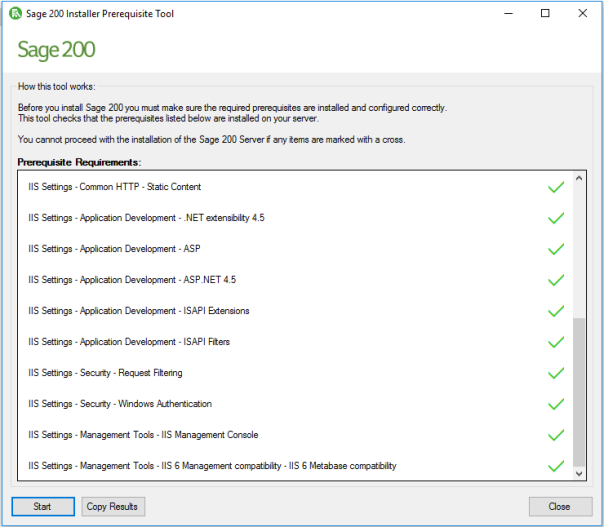
We have provided a tool which will help check that the required prerequisites are installed on the server. Use this tool to check the following:
- The server machine name starts with a letter, end with a letter or digit, and have as interior characters only letters, digits, and hyphens.
For more information about Domain name rules see section 2.3.1 of the following article:
http://www.faqs.org/rfcs/rfc1035.html
- Windows Identity Foundation is installed. This can be added as feature.
- Microsoft .Net Framework version 4.5.2 (or later) is installed.
- .Net Framework 4.5 (or later) Features with HTTP Activation.
- IIS v8 or higher installed, with the following settings:
| Common HTTP Features | Default Document |
| Directory Browsing | |
| HTTP Errors | |
| HTTP Redirection | |
| Static Content | |
| Application Development | .Net Extensibility 4.5 (or later) |
| ASP | |
| ASP .NET 4.5 (or later) | |
| ISAPI Extensions | |
| ISAPI Filters | |
| Security | Request Filtering |
| Windows Authentication | |
| Management Tools | IIS Management Console |
| Management Tools > IIS 6 Management Compatibility | IIS 6 WMI Compatibility |
| IIS 6 Metabase Compatibility |
To use the tool:
- Open the Prerequisite check tool folder on the ISO.
- Double - click the PreRequisiteCheckTool.exe.
- Click Start.
- The results will show which prerequisites are installed.
Additional requirements (not checked by the tool)
- All machines must have regional and language settings set to either English (UK) or English (Ireland) only.
- Your domain controller must not be set to Read Only.
- All machines must have a c:\ drive although Sage 200 can be installed and run from a drive other than c:\.
- Microsoft SQL Server:
- SQL server must support TLS 1.2.
- Must be running in Mixed Mode (SQL Server and Windows Authentication mode).
- The Server Collation for SQL server must be set to Latin1_General_CI_AS.
- If you're using Business Intelligence, SQL Server and Analysis Services must be installed on the same machine with the same instance name.
Prerequisites for the client
- All machines names must start with a letter, end with a letter or digit, and have as interior characters only letters, digits, and hyphens.
- All machines must have regional and language settings set to either English (UK) or English (Ireland) only.
- All machines must have a c:\ drive although Sage 200 can be installed and run from a drive other than c:\.
- Microsoft .Net Framework version 4.5.2 is installed.
- Microsoft .Net Framework version 3.5 is also installed, if you are using Sage 200 BI.
Solution Properties
- Solution ID
- 200427112400470
- Last Modified Date
- Fri Aug 07 14:16:14 UTC 2026
- Views
- 0