Fixing bucket corruption
Summary
How to fix bucket corruption in Sage 50 Accounts.
Description
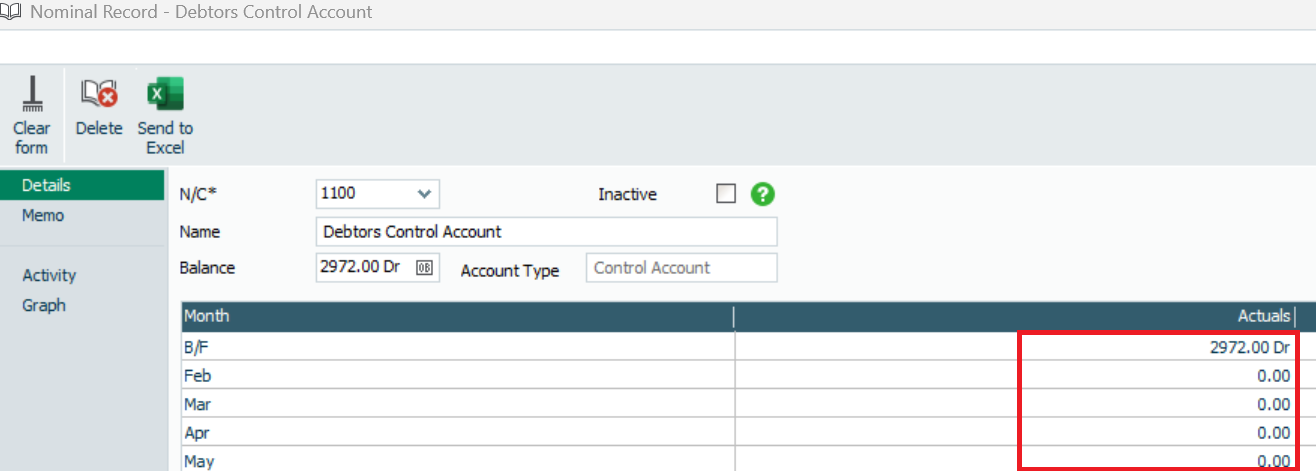
Each nominal, customer and supplier record shows monthly values in the Actuals column. The fields in the columns are called buckets. Bucket corruption happens when a bucket values don’t match the total shown in the record activity for the same period.

Resolution
Fix bucket corruption
Before you follow these steps, in Help then About you must check when the clear audit trail (CAT) was last ran. If you've ran the CAT with a date within the current financial year, the monthly buckets before the CAT be incorrect after recalculating. In this scenario, print any required reports before you recalculate.
- Go to File, then Maintenance, and select Yes to close any open windows.
- Select Check Data, then Recovery Tools, then follow the prompts to take a backup of your data.
- Click OK.
- Select Recalculate Period Values, then OK, then Close and Close again.
Possible causes and best practice
Bucket corruption can be caused by issues including crashes and power failures. There are also some specific causes to be aware of:
- Crashing out of the Year End process - The Year End process can take time to run, during which the Task Manager can show 'Not Responding'. Don't crash out of the year end routine
- Third-party data import - Data imported from third-party software can cause bucket corruption. Check your bucket values are correct after such imports
- Nominal codes missing from the chart of accounts - Before running the Year End, check the chart of accounts to ensure no codes are missing
Solution Properties
- Solution ID
- 200427112206488
- Last Modified Date
- Mon Feb 23 09:51:45 UTC 2026
- Views
- 0