

Summary
Description
Resolution
Sage 200 versions 2015, 2016, Summer 2017 (v12) or above
Follow the sections below in order to add your report to the menu of your program.Obtain the report location
Sage 200 2013 introduced changes to company specific reporting. By default, your reports are saved in the C:\Sage\reporting folder in three levels. If you are unsure of the location of your 'Sage share', please speak to the person that manages your IT services:
- Company - This folder holds reports and documents that you have customised for a specific company.
- Custom - This folder is for report and documents that have been customised and are used by all Sage 200 companies set up with System Administration.
- Default - This folder contains the standard reports and documents provided by Sage 200. The files held here should not be changed.
When a report is run, the company specific versions are checked first, then the custom versions and finally the default versions. The first version found will be the report or layout that is used. Part of this process involves pointing to the new report therefore you need to know the location of the file before continuing. If you already know the location of your report, please proceed to the next section. Otherwise, determine from the above where you would like to store your custom report or layout and then follow the steps below.
- Within Sage 200, open Report Designer.
- File > Open.
- Browse to the location of your report. Once you have browsed to the correct folder, make a note of the location, e.g. custom\sales\My Custom Report.report.
 NOTE: If you have not yet saved your report, use the File > Save As option and again, make a note of the path where the report will be saved, similar to the above format.
For further guidance about the changes to the reports folder structure please refer to the F1 & online help files.
Example: If using a Sales Order Status by Salesperson report and we wish to use this report for all companies that are used in Sage 200, the report would be saved to the C:\Sage\reporting\custom\reports\sop folder. If the report was to be used only for one particular company (for example, it contains the company logo specifically for that one individual company), it would be saved to C:\Sage\reporting\company\companyname\reports\sop.
NOTE: 'companyname' in this folder path refers to the company name exactly as it appears in System Administration.
Adding the report in System Administration
- Open System Administration.
- Select Features from the menu.
- In the list of features, browse to the location where you wish to add the new report. For example, a new report regarding Sales Orders would be held within Sales Order Processing. Right-click on the folder location and choose Add New Feature. This example uses the 'Basic' folder within the Sales Ledger.
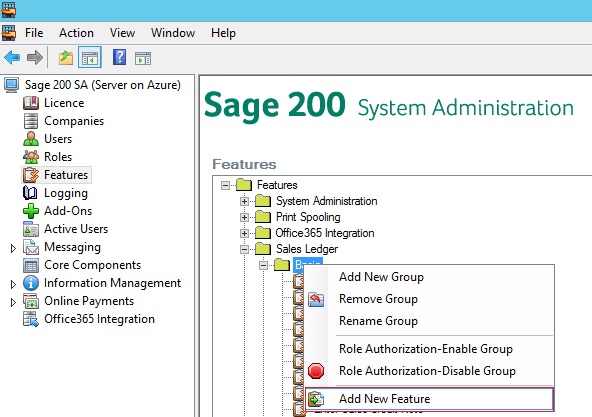
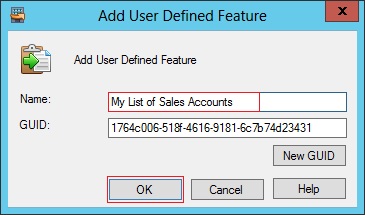
- Give the menu option a name. A GUID should already have been assigned. Click OK.
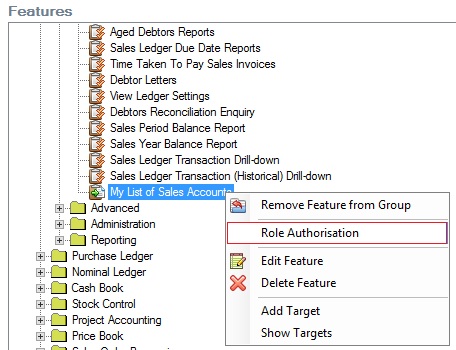
- Locate the new option from the list of features. Right-click on the feature and select Role Authorisation.
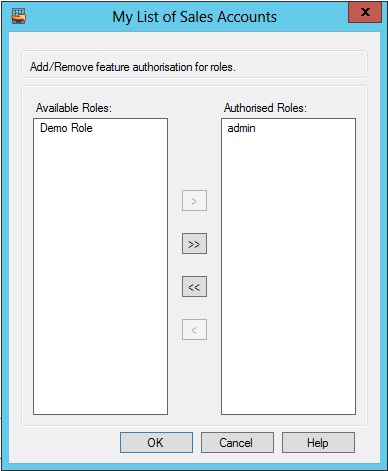
- Make the feature available to the required roles by selecting them from the Available Roles list and using the arrow button to move them into the list of Authorised Roles and select OK.
- With the feature still selected, the area at the bottom of the screen will display the Item name, the Report Group to which it belongs, Location and GUID number. Select the Targets tab from this section and select the Add... button to connect the report.
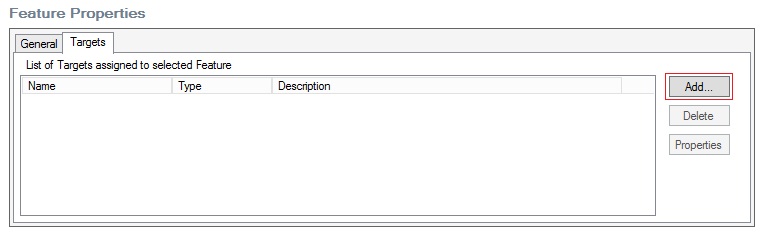
- Enter a name for the report against the Target Name field. Change the Target Type to Report. For the Target Action, enter the path from step 3 in the previous section.
NOTE: You must enter this exactly as it appeared in Report Designer. You must not use the ellipsis browsing button as you will be unable to browse to the correct path via this method. Note also that where the path in the previous section used forward slashes, the target path here must use backward slashes.
Adding the report in Sage 200 Professional 2015 or above
- Log in to Sage 200 as a user in the role that was assigned to the feature in System Administration.
- Select the Edit Menu pencil on the left hand side.
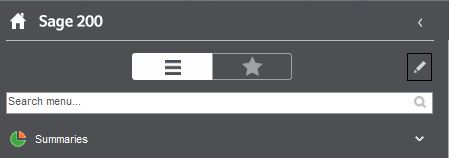
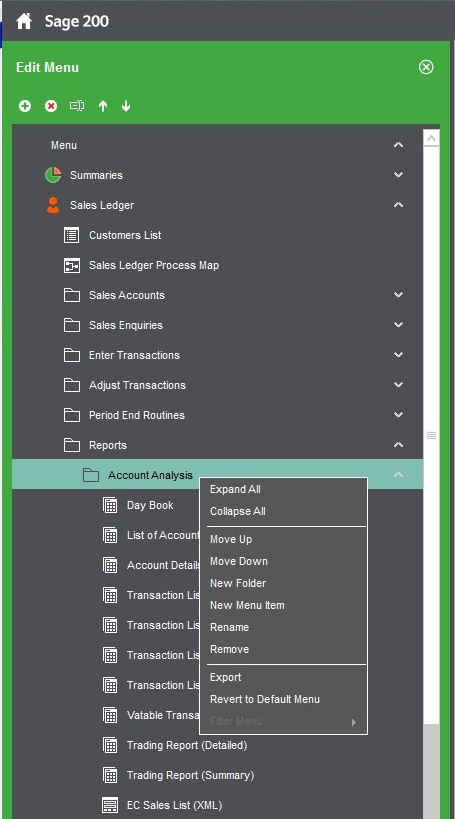
- Use the menu on the left and expand to the area where you wish to add the report. Right-click on the sub-menu and choose New Menu Item.
- Assign a name for the report as you want it to appear within the Sage 200 interface. Amend the Type dropdown to Report and the Customer Icon to REPORT.
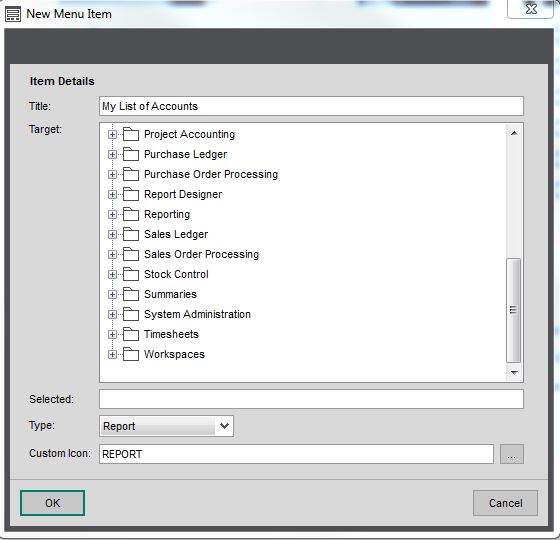
- Use the Tree View to locate the feature created in the previous section, highlight the option and click the OK button.
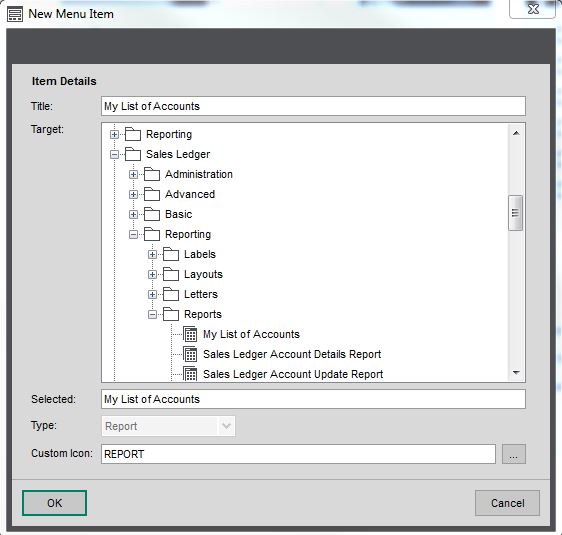
- Close the Edit Menu using the red cross.
Sage 200 versions 2010, 2011 or 2013 menus
Follow the sections below in order to add your report to the menu of your program.
Obtain the report location
Sage 200 Professional 2013 introduced changes to company specific reporting. By default, your reports are saved in the C:\Sage\reporting folder in three levels. If you are unsure of the location of your 'Sage share', please speak to the person that manages your IT services:
- Company - This folder holds reports and documents that you have customised for a specific company.
- Custom - This folder is for report and documents that have been customised and are used by all Sage 200 companies set up with System Administration.
- Default - This folder contains the standard reports and documents provided by Sage 200. The files held here should not be changed.
When a report is run, the company specific versions are checked first, then the custom versions and finally the default versions. The first version found will be the report or layout that is used. Part of this process involves pointing to the new report therefore you need to know the location of the file before continuing. If you already know the location of your report, please proceed to the next section. Otherwise, determine from the above where you would like to store your custom report or layout and then follow the steps below.
- Within Sage 200, open Report Designer.
- File > Open.
- Browse to the location of your report. Once you have browsed to the correct folder, make a note of the location, e.g. custom\sales\My Custom Report.report.
NOTE: If you have not yet saved your report, use the File > Save As option and again, make a note of the path where the report will be saved, similar to the above format.For further guidance about the changes to the reports folder structure please refer to the F1 & online help files.
Example: If using a Sales Order Status by Salesperson report and we wish to use this report for all companies that are used in Sage 200 Professional, the report would be saved to the C:\Sage\reporting\custom\reports\sop folder. If the report was to be used only for one particular company (for example, it contains the company logo specifically for that one individual company), it would be saved to C:\Sage\reporting\company\companyname\reports\sop.
NOTE: 'companyname' in this folder path refers to the company name exactly as it appears in System Administration.
Adding the report in System Administration
- Open System Administration. NOTE: Sage 200 Professional 2011 and below: You will be asked to authenticate your session at this stage.
- Select Features from the menu.
- In the list of features, browse to the location where you wish to add the new report. For example, a new report regarding Sales Orders would be held within Sales Order Processing. Right-click on the folder location and choose Add New Feature. This example uses the 'Basic' folder within the Sales Ledger.

- Give the menu option a name. A GUID should already have been assigned. Click OK.

- Locate the new option from the list of features. Right-click on the feature and select Role Authorisation.

- Make the feature available to the required roles by selecting them from the Available Roles list and using the arrow button to move them into the list of Authorised Roles and select OK.

- With the feature still selected, the area at the bottom of the screen will display the Item name, the Report Group to which it belongs, Location and GUID number. Select the Targets tab from this section and select the Add... button to connect the report.

- Enter a name for the report against the Target Name field. Change the Target Type to Report. For the Target Action, enter the path from step 3 in the previous section.
NOTE: You must enter this exactly as it appeared in Report Designer.
Adding the report in Sage 200
- Log in to Sage 200 Professional as a user in the role that was assigned to the feature in System Administration.
- Select Menu Design Mode from the Tools menu.
- Use the menu on the left and expand to the area where you wish to add the report. Right-click on the sub-menu and choose Add Menu Item.
- Assign a name for the report as you want it to appear within the Sage 200 Professional interface. Set the Target Type field as Existing Target.
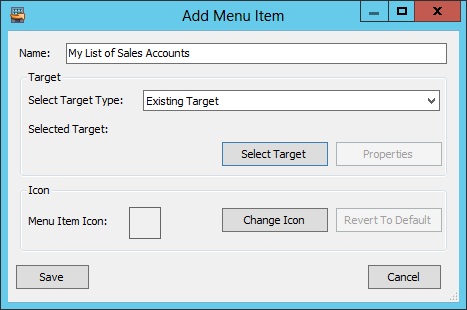
- Click Select Target. Use the Tree View to locate the feature created in the previous section, highlight the option and click the Select button.

- Select Save in the Add Menu Item window.
- Select Save then Close to exit Menu Design Mode.
Upgrade your licence
Growing business? Add more companies, users, or employees to your licence with ease. Leave your details and we’ll be in touch.

 Africa
 Asia
Asia Australia
 Canada
 France
 Ireland
 Kenya
Kenya Nigeria
 Portugal
 South Africa
 Spain
Spain United Arab Emirates
 United States
 Germany